


What if the cheapest-looking rental deal costs you time at pickup? Booking a rental car in Thailand online makes it easier to compare vehicles, but the headline rate alone won’t tell you whether the rental terms, documents, and pickup arrangements suit your trip.
Before you reserve, compare the full conditions and make sure you have the required documents ready. This guide explains how to choose a suitable self-drive vehicle, review a booking, and prepare for collection. SPS Car Hire offers budget-focused self-drive car and truck rentals, long-term packages, and a best-price guarantee.
Use the steps below to match a vehicle to your route and rental duration, review the booking conditions, and prepare for pickup. You’ll also find a checklist for checking your dates, driver details, vehicle category, and collection information before you confirm.
Key Takeaways
- Start with your travel dates, passenger count, luggage, and driving plans to narrow down the right self-drive vehicle.
- When booking a rental car in Thailand online, compare the full offer and rental terms, not just the headline price.
- Check the document requirements for your circumstances before confirming, and prepare your paperwork ahead of pickup.
- Use a booking checklist to catch errors in your dates, driver details, vehicle category, and collection information.
- SPS Car Hire offers budget-focused self-drive car and truck rentals, with long-term packages for longer stays.
Booking a rental car in Thailand online: what to decide first
Before comparing offers, get clear on when you need the vehicle, who will travel with you, what you’ll carry, and where you plan to drive. These details help you compare options on equal terms instead of choosing a displayed offer that doesn’t fit your trip.
Online booking generally involves entering your rental dates, choosing a vehicle, reviewing the conditions, submitting the requested details, and saving your confirmation. The vehicle category matters, but so do the rental period, collection and return arrangements, and any terms that affect your plans. A low headline offer won’t be useful if the vehicle doesn’t fit your passengers or luggage, or the conditions don’t work with your schedule.
What details should you have ready before searching?
Set realistic pickup and return dates, with approximate arrival and departure times. If you’re arriving late or leaving early, allow time to reach the pickup point and complete the handover.
Estimate the number of passengers and amount of luggage. Count bags and bulky items, not just seats, because they can change which vehicle category works. Consider the vehicle’s purpose too: a car may suit a passenger-focused journey, while a truck may be more practical for carrying work supplies or other loads. Check that the driver’s documents meet the requirements for their circumstances. The Driving licence in Thailand reference offers background on licence types and requirements.
Which rental option fits your trip duration?
For a short visit, choose dates that cover the days you actually need the vehicle, including your planned collection and return times. For an extended stay, compare the full rental period and terms instead of assuming a short-term offer will suit a longer booking. A dedicated long-term package may be a better fit for your plans.
SPS Car Hire offers self-drive car and truck rentals, including long-term packages. If you need a truck for an extended period, compare the rental duration and vehicle purpose with the package terms. Defining your dates, passengers, luggage, vehicle needs, and rental length first gives you a clearer basis for comparing options online.
How to compare online rental car offers without missing the terms
A fair comparison looks beyond the first figure on the screen. Offers for similar vehicles may differ in dates, inclusions, deposit conditions, or return requirements. Record the details side by side and read the terms for each specific reservation. Fuel, mileage, deposits, and cancellation rules can vary, so don’t assume one offer’s conditions apply to another.
| Compare | Offer A | Offer B | What to check |
|---|---|---|---|
| Vehicle category | Record category | Record category | Passenger capacity and luggage space |
| Dates and times | Record details | Record details | Collection and return arrangements |
| Rental duration | Record period | Record period | How the booking period is counted |
| Inclusions | List stated items | List stated items | What the offer says is included |
| Key terms | Note conditions | Note conditions | Fuel, mileage, deposit, cancellation, and damage terms |
Which booking terms deserve a careful read?
Check the rental period and collection instructions, including where and when pickup takes place. Review the return time and any stated fuel or vehicle-condition requirements. Then read the cancellation conditions and any deposit, mileage, or damage terms attached to that reservation. If a term is unclear, find its explanation in the booking information before proceeding.
Read insurance wording carefully too. Terms such as a damage waiver or excess can affect your responsibility, but their exact meaning depends on the policy. Check what the reservation says is covered, what is excluded, and what amount you may remain responsible for. A dedicated car rental insurance explainer can also help clarify common terminology.
How should you compare the vehicle and the offer?
Start with fit, not optional features. Check that the vehicle category can accommodate your group and luggage, then consider whether it suits your route and practical needs. A vehicle that works for city travel may be less comfortable for a longer road trip with several passengers and bags. For broader context on driving conditions, the World Health Organization’s Road safety in Thailand page provides relevant information.
Once you’ve matched the vehicle to your trip, compare the full terms alongside the displayed offer. SPS Car Hire provides budget-focused self-drive car and truck rentals to consider as you plan. Explore SPS Car Hire’s self-drive rentals as part of your comparison.
What documents and driving preparations should you check before booking?
Before booking a rental car in Thailand online, make two separate checks: what you need to drive legally in your circumstances, and what the reservation requires at pickup. These requirements are related, but they are not automatically the same. Licence rules can depend on where your licence was issued and your travel situation, while rental document requirements can vary between reservations.
What should international visitors check about driving documents?
Don’t assume that a home-country licence alone is sufficient, or that every visitor needs the same additional document. Check current Thai government guidance for your licence and circumstances, including whether an International Driving Permit (IDP) applies. The U.S. Embassy’s Driving in Thailand for foreigners page offers practical background for visitors, but use current Thai government information to verify the rules that apply to you.
Then review the booking’s document requirements before confirming. Keep the relevant identity and driving documents accessible, and make sure the names and details match the reservation. Resolve any unclear requirement before committing rather than discovering a mismatch at pickup. A booking confirmation does not prove that your licence or insurance is valid for driving in Thailand.
How can you prepare for driving in Thailand?
Planning ahead can make the first drive less rushed. Map your route and estimate journey time before setting out, and build in rest breaks rather than relying on a tight schedule. Check current road rules through authoritative Thai sources before driving, since general travel advice may not cover your particular route or situation.
- Save your route or map for offline use in case mobile data is unavailable.
- Keep reservation details and relevant emergency contacts accessible offline.
- Check your planned collection point and first destination so you know where you’re heading before leaving.
- Allow time to review the vehicle and rental instructions before starting your journey.
These steps don’t replace checking the rules, but they help keep key information close at hand. Verify legal driving requirements with current authoritative guidance, and use the booking’s terms to prepare for its document and collection process.
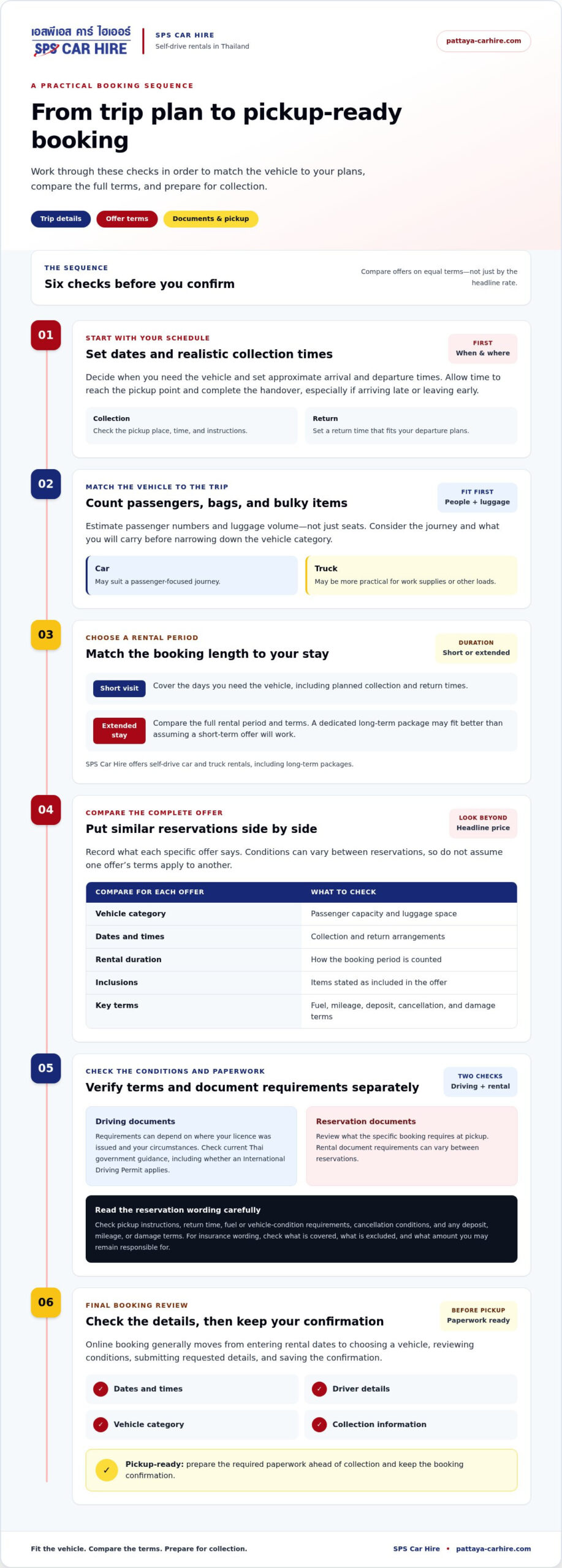
How to complete an online booking and prepare for pickup
Use a clear sequence when booking a rental car in Thailand online, and keep a record you can refer to at collection. Work through these steps before submitting your reservation:
- Enter your trip dates and times. Use collection and return details that match your itinerary.
- Compare suitable options. Choose a vehicle category that fits your passengers, luggage, and plans.
- Read the reservation terms. Review the rental period, inclusions, and stated payment, deposit, fuel, damage, and cancellation conditions.
- Submit the requested details. Check your information carefully before completing the booking.
- Save the confirmation. Keep a copy somewhere accessible during your trip, including offline.
Small errors are easier to address before travel than at the collection point. Check the driver’s name, rental dates, vehicle category, and pickup location or instructions shown on the confirmation.
What should you do immediately after booking?
Save the reservation confirmation and the contact information provided with the booking somewhere accessible, such as on your phone and in a separate offline copy. Compare the dates, collection details, rental duration, and vehicle category with your itinerary. Before travelling, revisit the stated payment, deposit, and cancellation terms so you understand what the reservation requires and what conditions apply if your plans change.
Keep booking communications and the documents required for your reservation together, digitally or in print as appropriate. This makes it easier to find the agreed details without relying on a strong internet connection or searching through old messages.
What should you check when collecting the rental car?
At collection, compare the vehicle with your reservation and check its visible condition. If you notice a concern, record it and raise it before setting off, following the handover instructions. This gives you and the rental provider a clear reference.
Before driving away, make sure you understand the return instructions, fuel expectations, and agreed rental period. Keep copies of the confirmation and any handover records with your trip details. A final review can prevent confusion later, especially if your return timing or route changes.
Once your dates and vehicle choice are set, explore self-drive car and truck rentals from SPS Car Hire as you arrange your Thailand trip.
Choose a practical, budget-friendly self-drive rental for Thailand
A good rental choice balances more than the displayed offer. Match the vehicle to your group and luggage, choose a rental period that fits your itinerary, understand the terms, prepare the required driving documents, and plan for pickup. This framework helps you compare options and avoid a vehicle or reservation that doesn’t work in practice.
SPS Car Hire offers budget-focused self-drive car and truck rentals, along with long-term packages for extended stays. The right fit depends on what you need the vehicle to do and how long you’ll need it. Look for clear value: a suitable vehicle and rental period, with terms you’ve read and understand.
When does a budget rental make practical sense?
Budget-friendly doesn’t mean automatically choosing the smallest or lowest-displayed option. It means selecting a vehicle that meets your practical needs and reviewing the conditions attached to the reservation. For example, a group travelling with several bags should consider luggage space as well as seating. If you’re carrying equipment, consider whether a truck better suits the purpose.
Self-drive access lets you plan your own transport around your itinerary, whether you’re arranging local trips or a longer stay. If you need a vehicle for an extended period, compare the rental duration with the available long-term package options instead of assuming a short-term arrangement will fit. Make this check before booking a rental car in Thailand online.
What is the final pre-booking checklist?
Before confirming, check each item against your plans and the reservation details:
- Dates and duration: Confirm the collection and return dates, times, and rental period.
- Vehicle category: Make sure it suits your passengers, luggage, and intended use.
- Collection plan: Review the stated pickup location and instructions.
- Booking terms: Read the applicable conditions, including any stated deposit, fuel, mileage, damage, and cancellation details.
- Driving documents: Prepare the documents required for your circumstances and reservation.
Once those details line up, you’re in a better position to make a considered reservation. Explore SPS Car Hire’s rental options to take the next step toward a practical self-drive vehicle for your Thailand trip.
Make Your Thailand Self-Drive Plans with Confidence
A smoother rental starts with a vehicle that suits your passengers, luggage, and plans, plus dates and a rental period that match your itinerary. Before confirming, compare the full reservation terms rather than relying on the displayed offer alone. Check what applies to fuel, mileage, deposits, cancellation, and damage, and prepare the driving documents required for your circumstances.
After booking, keep the confirmation and collection details accessible. Review the driver’s name, dates, vehicle category, and pickup information so you can arrive prepared and avoid preventable confusion.
SPS Car Hire offers budget-friendly self-drive car and truck rentals, a best-price guarantee, and long-term rental packages for extended stays. Explore budget-friendly self-drive rental options to take the next step. With a suitable vehicle and the key details in order, booking a rental car in Thailand online can be a practical start to exploring on your own schedule. Enjoy the journey and drive safely.
Frequently Asked Questions
Can I book a rental car in Thailand online?
Yes. Online reservations generally involve entering your travel dates, comparing vehicle categories, reviewing the rental terms, and submitting the requested details. Options and steps can differ, so read the conditions for the specific reservation before completing it. Save the confirmation and check the driver’s name, rental dates, vehicle category, and collection information against your itinerary.
What documents do I need to rent a car in Thailand?
Document requirements depend on your circumstances and the specific reservation. Before confirming, review the booking’s stated requirements and check current authoritative guidance for your travel situation. You may need identity and driving documents, such as your passport and valid home-country licence, but don’t assume these are the only documents required. Check whether an International Driving Permit or other paperwork applies, and keep the relevant documents accessible for pickup.
Do I need an International Driving Permit to rent a car in Thailand?
There isn’t a universal answer for every renter. Whether an International Driving Permit is needed can depend on your circumstances, including where your driving licence was issued. Check current Thai government guidance for your situation and review the rental’s document requirements before booking. Don’t rely on general travel advice alone or assume that an IDP automatically settles every legal or rental requirement.
How do I compare rental car offers online?
Compare the complete reservation, not just its displayed offer. Check that the vehicle suits your passengers and luggage, then compare dates, rental duration, and stated inclusions. Read the specific terms for deposits, mileage limits, fuel expectations, cancellation conditions, and damage or insurance arrangements. These details can differ between offers. A simple side-by-side list helps you spot differences and choose based on the full terms and practical fit.
Is it safe to pay for a rental car online?
Online payment safety depends on using a legitimate booking process and protecting your information. Enter details only through the payment steps provided with your reservation, check that the page and amount match the booking, and avoid sharing sensitive information through unexpected messages or links. Payment methods can vary. Keep a record of the confirmation and payment communication, and review the stated payment and deposit terms.
What should I check before confirming an online car rental?
Check that the driver’s name, dates, rental duration, vehicle category, and collection details are correct. Read the applicable terms, including stated inclusions, deposit, fuel, mileage, cancellation, and damage conditions. Confirm which driving documents are required for your circumstances and reservation. Make sure the vehicle fits your group and luggage, then save the confirmation and related communications after booking so you can refer to them during your trip.
Can I rent a car in Thailand for a long stay?
Yes, a longer rental may suit an extended stay, but rental periods and terms vary. Compare the full duration and conditions rather than assuming a short-term booking structure will fit. SPS Car Hire offers long-term car and truck rental packages for extended transportation needs. Review the package terms and make sure the vehicle category, rental period, and collection arrangements align with your plans before confirming.
What should I do if my rental confirmation details are incorrect?
Review the confirmation as soon as you receive it, then use the contact details in the booking communication to address any discrepancy. Clearly identify the incorrect item, such as a misspelled driver name, wrong date, vehicle category, or collection detail, and keep a copy of your message and any reply. Raise an error before pickup and save the corrected confirmation with your travel documents.
 -
- -
- -
- -
- -
- -
- -
-